
# Nuxt 生命周期

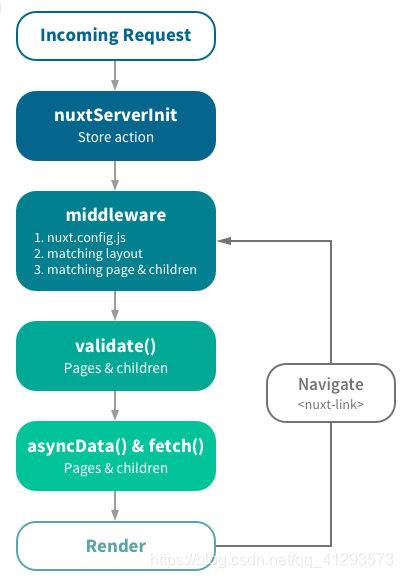
# 重要的点
- 获取数据 asyncData() && Fetch()
- 中间件 middleware
// 列如在middleware目录中创建baseurl.js文件来定义中间件函数

import axios from 'axios'
export default function ({ route, store, redirect }) {
    if (store.state) {
        alert('抱歉您没有token,请先登录')
        return redirect('/search')
    }
}


// 之后在nuxt-config.js中配置,之后就可以在每一个页面中使用

router: {
    middleware: 'baseurl'    // 是js文件名字
}


// 但是如果不想在每一个页面中使用,可以在需要的页面中指定

// 指定中间件函数
middleware: 'baseurl',
1
2
3
4
5
6
7
8
9
10
11
12
13
14
15
16
17
18
19
20
21
22
23
24
25
2
3
4
5
6
7
8
9
10
11
12
13
14
15
16
17
18
19
20
21
22
23
24
25
- store 持久化数据(vuex-persistedstate)
- validate 动态路由检查数据
- vuex 状态树
actions dispatch 异步 mutations commit 同步
- 全局与局部的 css
- auth 鉴权
- 路由自动生成
- head 设置
- 插件系统
- 路由传参
- nuxtServerInit 首屏获取服务端数据
# tips
- 修改 默认启动端口
"server":{
 "host":"127.0.0.1",
 "port":"3304"
}
1
2
3
4
2
3
4
- middleware中的文件抛出错误
export default function({ store, error, redirect }) {
  if (!store.state.user.userInfo.auth) {
      error({
       message: '没有权限哦!',
      statusCode: 403
     })
  }
}
1
2
3
4
5
6
7
8
2
3
4
5
6
7
8
asyncData 挂载时没有 this 对象
修改成后缀为 html 的页面
<a @click="$router.push(`/strA-${'参数id'}.html`)">去到页面A</a>
1
2
2
- 获取当前路由名称和路径
获取当前路由名称

$nuxt.$route.path
获取当前路由路径

$nuxt.$route.name
1
2
3
4
5
6
7
2
3
4
5
6
7
- 在子组件中不要再根元素上使用 v-if 而应该使用 v-show
// bad
<div v-if="isVip">

</div>
1
2
3
4
2
3
4
//good
<div>

</div>
1
2
3
4
2
3
4
- 遇到 Vue 错误时候
 [Vue warn]: The client-side rendered virtual DOM tree is not matching server-rendered content ( Nuxt / Vue / lerna monorepo )

 服务端与客户端渲染不一致的问题, 这个问题解决方法有两种

 1. 使用 <clinet-only></clinet-only> 标签进行包裹,使其只在客户端加载

 2. 查找代码,用 v-if 切换成 v-show 进行解决

 3. 在 nuxt.config.js 中的 使用(未尝试)
 extend (config, ctx) {
   config.resolve.symlinks = false
 }
1
2
3
4
5
6
7
8
9
10
11
12
8. nuxt项目`Failed to execute 'appendChild' on 'Node'`,有没有什么好办法?

nuxt项目,刷新页面之后报错`Error while initializing app DOMException: Failed to execute 'appendChild' on 'Node': This node type does not support this method`.有没有什么好的解决办法?


```javascript
1.
一般在开发环境下,日志会有warning:The client-side rendered virtual DOM tree is not matching server-rendered content. This is likely caused by incorrect HTML markup, for example nesting block-level elements inside <p>, or missing <tbody>. Bailing hydration and performing full client-side render.

但是不影响使用,而且一般都是在刷新当前页面的时候才会报这个警告。但是一旦build发布到线上就会发生DOMException: Failed to execute 'appendChild' on 'Node': This node type does not support this method的问题。

我的解决方案是,直接在疑似产生The client-side rendered virtual DOM tree is not matching server-rendered content问题的代码上包裹一层<client-only>标签,直接不让后台渲染这部分代码就解决这个问题了

2. 使用 v-if 切换成 v-show
1
2
3
4
5
6
7
8
9
10
11
12
13
14
15
16
2
3
4
5
6
7
8
9
10
11
12
13
14
15
16
nuxt 项目
TypeError: [nuxt] Error while mounting app: Cannot read property 'indexOf' of undefined同 第 8 问题 解决方法一致网站根目录其实就是平常可见的 /static 目录
nuxt.js 关于页面中css 提取到 link的方法
那就是在nuxt.config.js下的build里添加 extractCSS: { allChunks: true }这句话
1